10 Best WHOIS Lookup Tools in 2026
Looking up a domain’s registration data should be simple. But in practice, many WHOIS lookup sites bury results under ads or return raw text that changes format from one registry to the next. Even when a lookup works, the registrant’s name and email are often redacted, leaving you with just a registrar and a few dates.
Those gaps slow down security teams triaging phishing domains, IT admins tracking expiration dates, and developers who need clean domain registration data for their apps. This guide covers the 10 best WHOIS lookup tools in 2026 with their key features, pros, cons, and pricing.
Best WHOIS Lookup Tools
We chose these tools to cover different types of WHOIS lookup tools: browser lookups, a command-line client, WHOIS APIs, a historically enriched record, and historical WHOIS. All of them, except SecurityTrails, offer free access, a free tier, introductory credits, or a free lookup. The pros and cons come either from our own experience or from user reviews on G2 and Product Hunt and discussions on Reddit.
Full disclosure: we at WhoisXML API maintain some of these tools, but we firmly believe ours are the best in some aspects.
| Tool | Type | Best for | Free access |
|---|---|---|---|
| WhoisXML API WHOIS API | WHOIS API | WHOIS automation in apps, scripts, and security tools | 500 introductory API credits |
| WHOIS command | Command-line client | One-off lookups from a terminal | Free |
| WhoisXML API WHOIS History | Historical WHOIS | Uncovering registrant details from before WHOIS redaction | Shares 500 introductory DRS credits |
| WhoisXML API Domain Info | Historically enriched record | Powering EASM and CTEM solutions with records that fill redacted fields | Shares 500 introductory DRS credits |
| ICANN Lookup | Browser WHOIS or RDAP lookup | GUI-based RDAP lookups from an official source | Free |
| WhoisXML API Domain Research Suite | Browser WHOIS or RDAP lookup, Historical WHOIS | Cyber investigations that pivot between WHOIS, history, and reverse WHOIS without code | Shares 500 introductory DRS credits |
| DomainTools | Browser WHOIS or RDAP lookup, Historical WHOIS | Domain risk scoring with infrastructure context | Free browser WHOIS lookup; paid membership from $99/mo |
| SecurityTrails | WHOIS API, Historical WHOIS | One API for WHOIS, DNS, and subdomain data | No free plan listed; paid plans start at $500/mo |
| WhoisFreaks | WHOIS API, Historical WHOIS | Budget-minded builders combining several domain data APIs | 500 introductory credits |
| IP2Location.io IP2WHOIS | WHOIS API | Prototyping on a free monthly allowance | 500 queries per month |
1. WhoisXML API WHOIS API: best for WHOIS automation
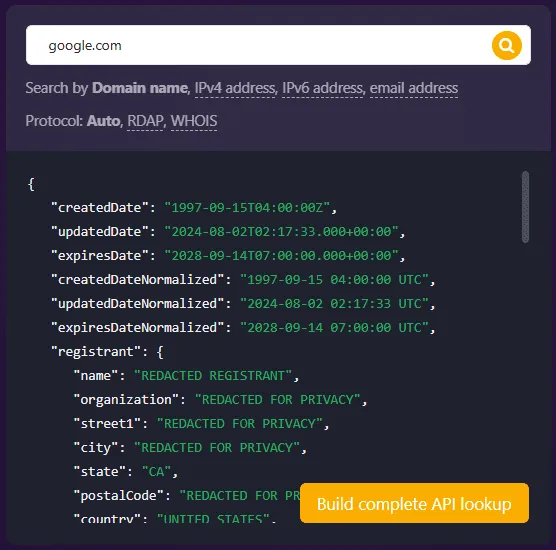
WHOIS API is a REST API from WhoisXML API that returns current WHOIS registration data as parsed, normalized fields. You send a domain name, an IP address, or an email address, and the API returns a structured record instead of the registry’s raw text response. Developers use it to add WHOIS data to security tools, monitoring scripts, and apps.
For those who prefer to use a graphical user interface, there’s the GUI-based WHOIS lookup tool that relies on the same data, and for those who want to have all the data at hand locally, there’s the WHOIS database download option.
Finally, since it’s 2026 and AI is everywhere, there’s the LLM-based internet intelligence assistant Jake AI that can answer your WHOIS-related questions and the hosted MCP server if you prefer your own LLM.
Key features:
- Parsed WHOIS records: Returns the registrar, creation and expiration dates, domain status, name servers, and available contact details as separate fields, which simplifies automation.
- JSON and XML output: Lets you choose the response format that fits your application or script.
- Cache controls: The API allows you to choose whether you want the freshest available record or a cached one. The maxCacheAgeHours parameter sets the maximum age of a cached record. Setting it to 0 requests the freshest available record (no older than 24 hours), which costs 5 credits instead of 1.
- RDAP-ready: WhoisXML API allows users to choose between WHOIS and RDAP — either automatically or manually. In the automatic mode, the tool tries to choose the most informative record (WHOIS and RDAP records may contain different data). Note that RDAP isn’t available for all TLDs (for RDAP availability, check our RDAP support dashboard).
Protocol support:
- Both WHOIS and RDAP
Pros:
- Easy to use and integrate. A digital analyst said they could use the data in security investigations without specialist knowledge.
- Reliable. A user said it has been stable in their experience and that they trust it’s not going to flatline later.
- Trusted by security vendors. WhoisXML API works with a wide variety of security vendors, which remain happy customers for years. For example, Proofpoint’s VP of Engineering said WhoisXML API’s domain intelligence lets them integrate WHOIS lookups into their security heuristics and algorithms without having to host, merge, or normalize the data themselves.
Cons:
- A user said redacted registrant fields sometimes left allow-or-block decisions unresolved. This happens with any current WHOIS API, since registries and registrars redact the data at the source. Products with historical data, such as Domain Info API and WHOIS History, can fill some of these gaps. We’ll get to these later in our article.
- Another reviewer preferred CSV and web views to raw XML or JSON — they are probably not alone, and non-developers may prefer the WHOIS Lookup web tool with a GUI.
Pricing: New accounts get 500 free API credits to start, while paid plans are priced by query volume.
2. WHOIS Command: best for one-off CLI lookups
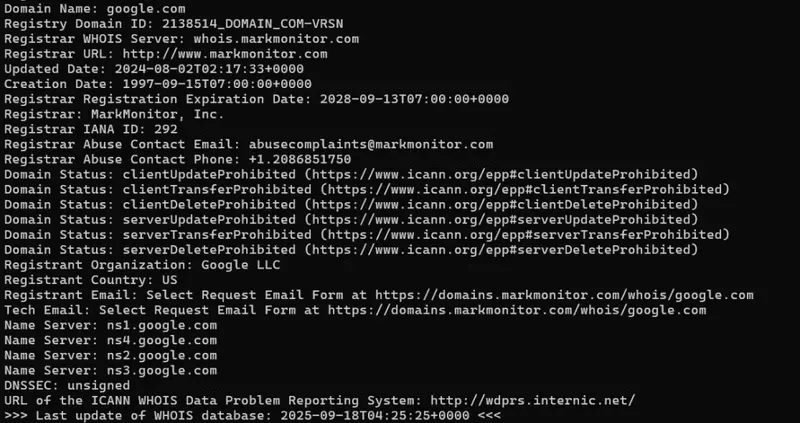
The WHOIS command is a free command-line client that admins and analysts use to check a domain’s registration data from the terminal. It’s mostly notable because almost every operating system has it: most Linux distributions offer it as a pre-installed package, macOS includes a version by default, and Windows users can install Microsoft Sysinternals Whois or use WSL.
In 2026, it’s not a default choice anymore even for one-off lookups because WHOIS is becoming legacy and RDAP is slowly but steadily replacing it (read more about it in our “What is RDAP” post). The WHOIS command doesn’t work with RDAP, so for some TLDs it won’t produce a record anymore. However, the command still works for most TLDs. We detailed how to use the WHOIS command in a separate post.
Key features:
- Domain, IP, and ASN lookups: Queries domain registries and RIRs for IP addresses and autonomous system numbers.
- Plain-text output: Prints the server’s raw response, which you can pipe to grep, awk, or other shell tools.
- No account needed: Works without registration or an API key.
Protocol support:
- WHOIS only
Pros:
- It’s free to use.
- There are query options and flags that can refine lookups.
Cons:
- Output format varies by registry, WHOIS servers may rate-limit repeated queries, and the command depends on legacy WHOIS services that gTLD registries and registrars are no longer required to run.
- The WHOIS command tool returns long blocks of text even when you only need one detail, which can clutter outputs. On Linux, the -H flag hides the legal disclaimers some domain registries add. However, for automation purposes, it may still be hard to deal with the lack of structure in its responses.
Pricing: Free. WHOIS servers apply rate limits.
3. WhoisXML API WHOIS History: best for seeing past WHOIS redaction
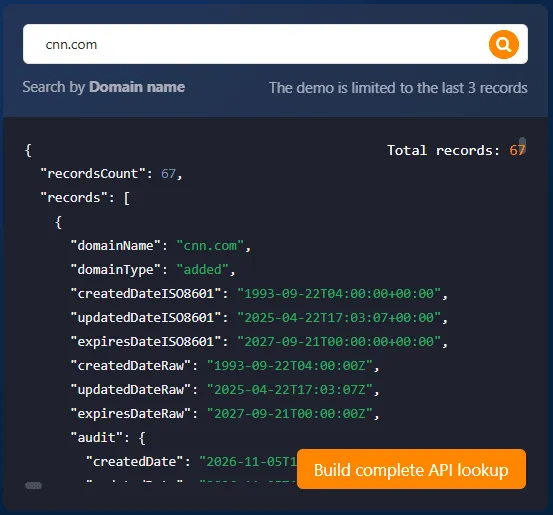
WHOIS History is a WhoisXML API product that returns an archive of snapshots of a domain’s WHOIS record, covering ownership changes all the way back to 2010. Unlike a regular WHOIS lookup, the WHOIS history lookup produces multiple records instead of one, revealing changes in the domain’s ownership history.
Analysts use it to see how the registrant, registrar, contact emails, and name servers changed over time, and most importantly, to uncover registrant contacts from before the implementation of WHOIS privacy. It’s available as an API, a web lookup, a Domain Research Suite (DRS) tool (we’ll get to it later as well), and historical WHOIS database downloads.
Key features:
- Historical snapshots: Returns earlier versions of a domain’s registration record, including contacts and registrar changes.
- Record-count preview: Shows how many historical records exist for a domain before you pay for the full results.
- Access options: Available as an API for automation. It can also be accessed through a web lookup, a Domain Research Suite tool, or historical WHOIS database downloads.
- Shared DRS credits: Uses the same credit balance as Domain Info API and other DRS tools.
Protocol support:
- Proprietary database (populated using both WHOIS and RDAP)
Pros:
- A user recommended WhoisXML API’s historical records for finding a contact email from before domain privacy protection was added.
- A user said the demo shows actual historical records, not just counts of records and changes like many other demos.
Cons:
- Users noted that some domains used privacy services from the start, so even older records may not show the real registrant.
- Archive depth varies by domain, and some domains have few historical records. Check the record-count preview before you run a full query.
Pricing: Shares the 500 introductory DRS credits with other DRS tools. A full-history query costs 50 credits, and a record-count preview costs 1 credit. DRS plans start at $19 per month for 1,000 credits, or $29 for 1,000 one-time credits.
4. WhoisXML API Domain Info: best for powering EASM and CTEM solutions
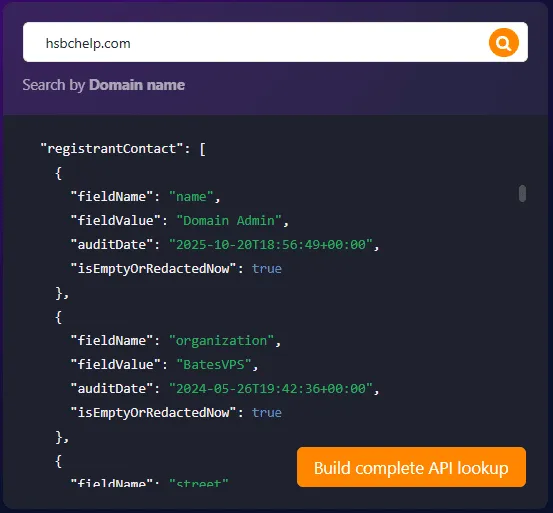
Sometimes you don’t need all the historical WHOIS records — you only need the latest data that doesn’t say “redacted” in the domain owner contact details. That’s what Domain Info API is for. It is a WhoisXML API product that returns one consolidated registration record for a domain. When current WHOIS fields are redacted, it can fill the gaps with the last available historical data. It can also return the last known details of expired domains. Security product builders often use it to enrich asset records when current WHOIS data is redacted.
Domain Info is also available as a web-based lookup, an API, and a database download. You can find it in the web-based Domain Research Suite as well.
Key features:
- One consolidated domain record: Returns all registration fields in one response, with an auditDate showing when each value was recorded.
- Historical gap-filling: Fills empty or redacted current fields with the latest available historical data and marks them with an isEmptyOrRedactedNow flag.
- Expired-domain data: Returns the last available registration details for domains that have expired.
- Shared DRS credits: Draws from the same credit balance as other Domain Research Suite tools.
Protocol support:
- Proprietary database (populated using both WHOIS and RDAP)
Pros:
- It can return records for expired domains that regular WHOIS lookups can no longer retrieve, which helps workflows that depend on getting a response.
- When historical data exists, it fills fields that regular WHOIS leaves empty or redacted, which gives threat intelligence teams more leads to pivot from, even for domains that were taken down.
Cons:
- It is more costly than a regular WHOIS lookup.
- Historical values aren’t current data. Recovered fields can come from different dates, and an old email address may belong to a previous registrant, so you could attribute a domain to the wrong owner.
Pricing: New users get 500 introductory Domain Research Suite (DRS) credits, shared across DRS tools. A Domain Info API request costs 5 credits, so the free balance covers up to 100 requests. DRS plans start at $19 per month for 1,000 credits, or $29 for 1,000 one-time credits.
5. ICANN Lookup: best for GUI-based RDAP lookups
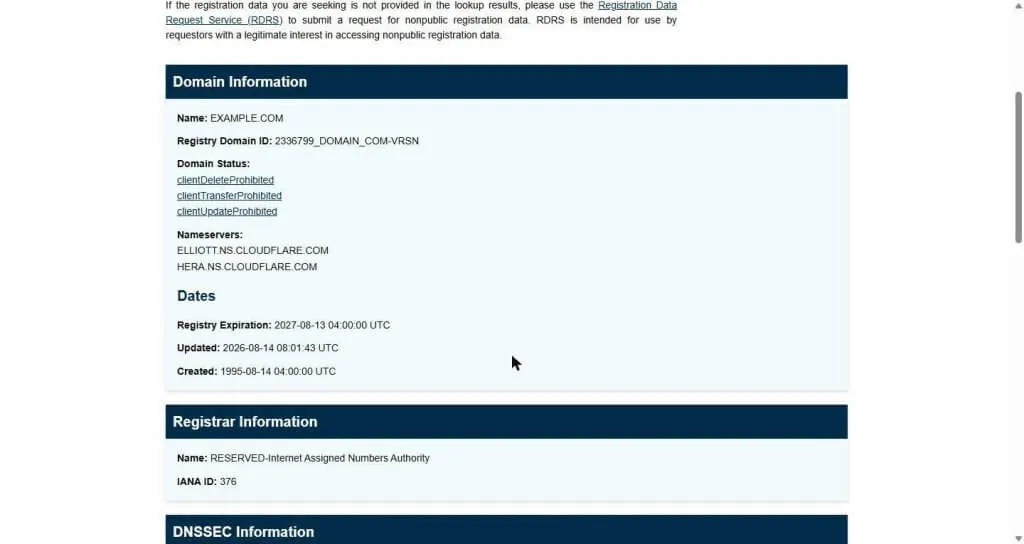
ICANN Lookup is a free browser tool from ICANN that retrieves domain registration data directly from registries and registrars through RDAP, with a WHOIS fallback where RDAP isn’t available. It shows the registrar, status codes, important dates, name servers, and any contact data the registrar publishes. This is the most basic WHOIS lookup you can use to confirm a domain’s registrar and status — and the data would be coming directly from the organization that helps coordinate the domains on the Internet.
Key features:
- RDAP-based lookup: Looks up domain names, IP networks, and autonomous system numbers (ASNs) through RDAP.
- Registrar information: Shows the sponsoring registrar and its contact details.
- Domain status codes: Displays EPP status codes such as clientTransferProhibited.
- No account needed: Free to use in any browser.
Protocol support:
- RDAP, with WHOIS fallback where available
Pros:
- Users frustrated with ad-heavy WHOIS sites described ICANN Lookup as a cleaner option.
- A user used it to find a domain’s registrar when contacts were redacted, which at least shows where to send abuse or transfer requests.
- Users recommend it when they need to confirm registration data rather than run fast availability checks.
Cons:
- A user found the registrar but still couldn’t tell who controlled the domain because the contacts were redacted. This is a typical WHOIS lookup problem, which can only be addressed by using historical WHOIS data.
- A user reported a .com.au lookup failing because ICANN Lookup couldn’t find an RDAP service for it. ICANN’s WHOIS fallback only covers gTLD registries, so ccTLDs without an RDAP service can fail.
- Only available as a web-based GUI tool, not suitable for automation.
Pricing: Free.
6. WhoisXML API Domain Research Suite: best for cyber investigations
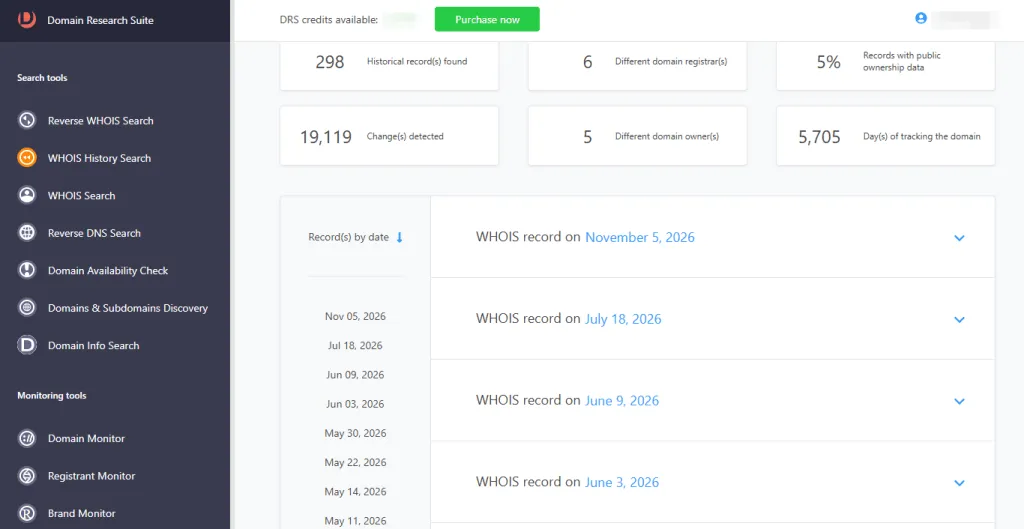
Domain Research Suite (DRS) is a web-based investigation platform from WhoisXML API. It puts the aforementioned WHOIS lookups, WHOIS history, and Domain Info lookups together in one interface, adding reverse WHOIS, reverse DNS, and domain discovery tools, along with monitoring tools such as Domain Monitor, Registrant Monitor, and Brand Monitor. Analysts use it to follow investigation leads and pivot between tools without writing code.
Key features:
- WHOIS and WHOIS history lookups: Shows current and archived registration records for a domain.
- Easy pivoting: Lets analysts take a result from one tool, such as an email address from a historical WHOIS record, and run it through another, such as reverse WHOIS, in the same interface.
- DNS and domain discovery tools: Adds reverse DNS lookup and related-domain searches to the same workspace.
- Monitoring: Some DRS tools can watch for new domains or record changes that match your search terms and send email alerts.
Protocol support:
- WHOIS and RDAP plus proprietary databases for WHOIS history and Domain Info
Pros:
- DRS brings together most tools that one needs for domain intelligence investigations, allowing for one-click pivots between them.
- A user described running reverse WHOIS on a historical email to find related domains, which gave the investigation a next step — a pivot that DRS makes extremely easy.
Cons:
- Credit costs vary by tool and monitor, so you need the pricing calculator to estimate how far a plan will go.
- Historical coverage may not reach far enough back for some investigations. A user in 2021 found records for their case only went back to 2011.
Pricing: New users get 500 introductory credits shared across DRS tools. Plans start at $19 per month for 1,000 credits, or $29 for 1,000 one-time credits.
7. DomainTools: best for domain risk scoring
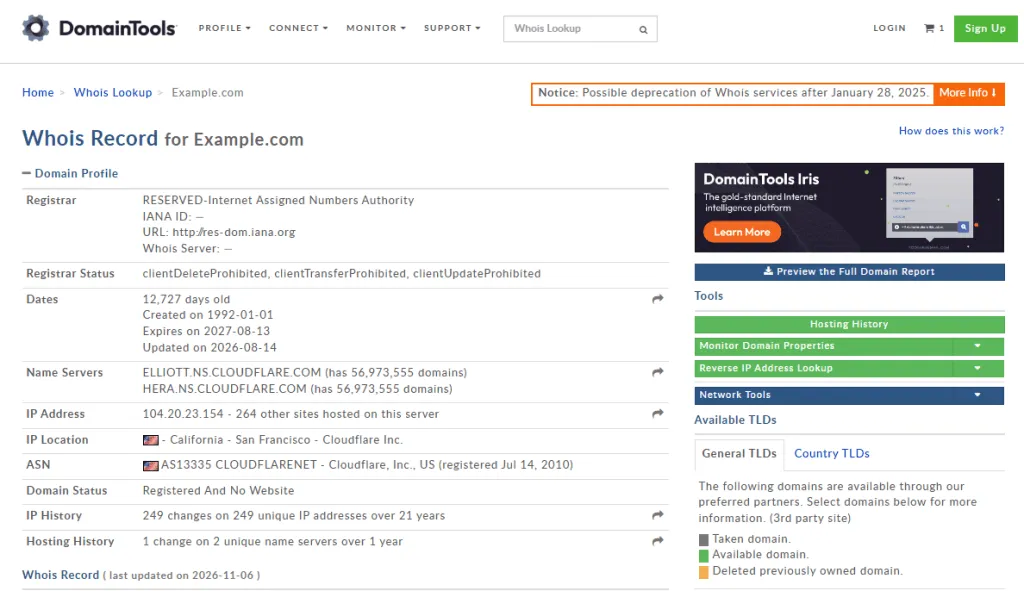
DomainTools is a domain intelligence vendor that offers a free WHOIS lookup and a paid membership that comes with more options: WHOIS history, reverse WHOIS, and the Iris platform for investigations. Iris adds hosting history, related infrastructure, screenshots, and domain risk scores to registration data. Security teams use it to investigate suspicious domains.
Key features:
- WHOIS lookup: Shows current registration data in a browser.
- WHOIS history and reverse WHOIS: If you pay for the membership, you get access to features that show past records and domains linked to the same registrant.
- Domain risk scoring: Iris products assign risk scores to help analysts decide which domains to investigate first.
- Infrastructure context: Iris connects domains to hosting changes, IP addresses, and related domains.
Protocol support:
- Both WHOIS and RDAP
Pros:
- An OSINT investigator said DomainTools historical WHOIS reports are very detailed, which helps in complex cases.
- A reviewer said integrating the reports into an existing workflow was simple.
- A user comparing providers found an older DomainTools record that another service didn’t return.
Cons:
- A reviewer objected to the cost of buying one-off historical reports.
- A reviewer who liked the reports still found parts of the interface confusing to navigate.
- A reviewer reported records they considered stale or incomplete.
Pricing: A free account offering limited lookups is no longer available. Individual membership is listed at $99 per month or $995 per year, with set allowances for WHOIS and historical lookups. Iris and enterprise products are priced on request.
8. SecurityTrails: best for those who want one API for everything
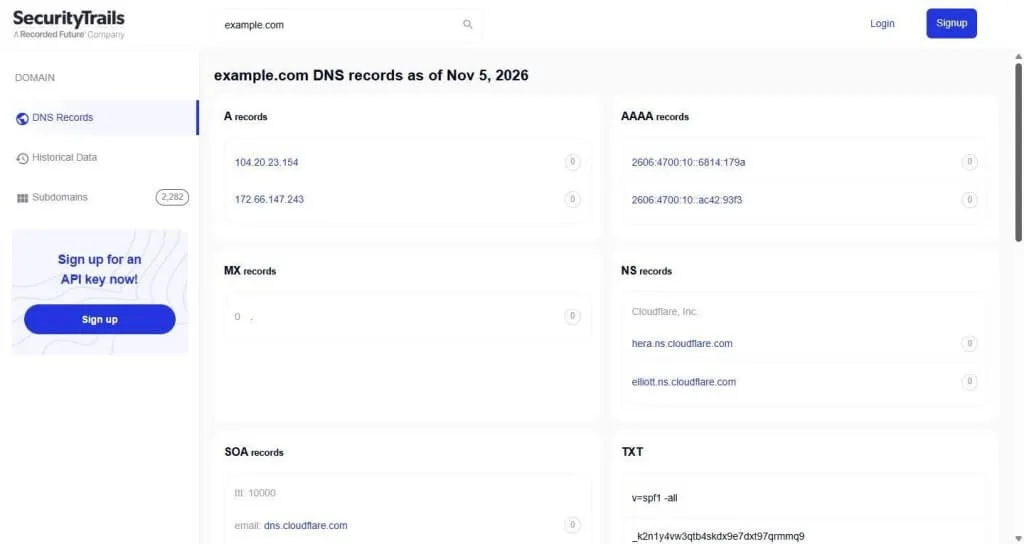
SecurityTrails, owned by Recorded Future, is a DNS and domain intelligence platform with one unified API. It provides current and historical DNS records, subdomains, WHOIS data, and related domains through one service. Developers and threat researchers use it to map a domain’s infrastructure and track DNS changes.
Key features:
- Historical DNS: Shows how a domain’s A, MX, NS, and other records changed over time.
- Subdomain discovery: Lists known subdomains for a domain.
- WHOIS data: Returns current and historical registration data alongside DNS records.
- Single API: Gives access to several data types through one integration.
Protocol support:
- WHOIS; RDAP support isn’t documented
Pros:
- A security engineer said the data produced very few false positives in their attack surface automation workflow.
- A reviewer valued reviewing exposures and related infrastructure across many assets from one view.
- Users researching domain history recommend SecurityTrails for historical DNS data alongside WHOIS archives.
Cons:
- At $500 per month, SecurityTrails has the highest starting price of the tools on this list that publish their pricing.
Pricing: The Professional plan costs $500 per month for 20,000 queries, and the Business plan costs $1,500 per month for 65,000 queries. Enterprise pricing is available on request.
9. WhoisFreaks: best for budget-minded builders
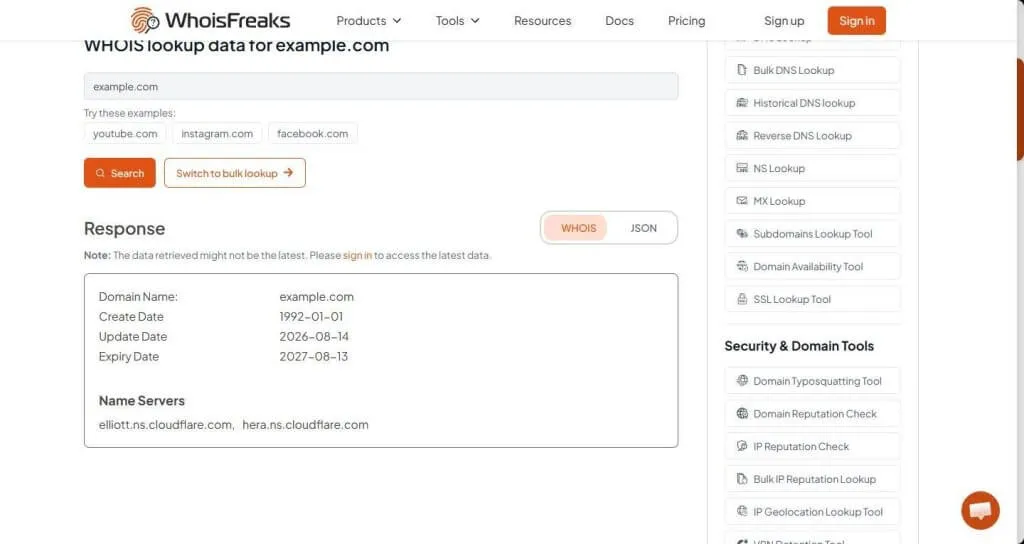
WhoisFreaks is an API provider for current WHOIS, historical WHOIS, reverse WHOIS, DNS, and SSL certificate data. Developers use its credit-based APIs to add domain data to internal tools, research scripts, and commercial apps.
Key features:
- Live WHOIS API: Returns current registration data in a structured format.
- Historical and reverse WHOIS: Provides past records and domains linked to a registrant.
- DNS and SSL lookups: Adds DNS records and certificate data from the same provider.
- Credit-based billing: Uses one credit balance across products.
Protocol support:
- Both WHOIS and RDAP
Pros:
- A reviewer said the lookup process for contacts, expiration dates, and historical data was simple to follow.
- A mid-market reviewer praised the balance between usability and cost.
Cons:
- One reviewer said the interface could use some polish.
- In one comparison, a user found no useful historical record in WhoisFreaks for a domain where DomainTools returned one.
Pricing: New accounts get 500 free introductory credits. Paid plans start at $10 per month for 5,000 credits. WhoisFreaks also offers one-time purchases of API credits, starting at $20 for 5,000 credits.
10. IP2Location.io IP2WHOIS: best for prototyping on a free monthly allowance
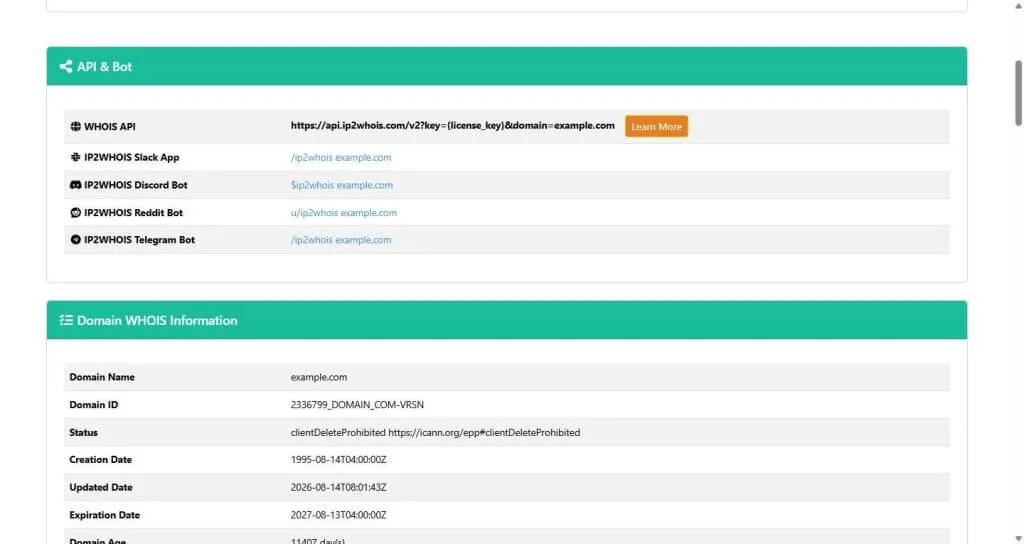
IP2WHOIS is a domain WHOIS REST API from IP2Location.io. It returns registration fields such as the registrar, dates, status, contacts, and name servers. Developers use it to add domain registration checks to applications and prototypes.
Key features:
- Domain WHOIS API: Returns parsed registration data through a REST endpoint.
- Recurring free plan: Includes a monthly allowance of free WHOIS requests.
- Domain age: Returns the domain’s age in days alongside its creation, update, and expiration dates.
Protocol support:
- WHOIS; RDAP support isn’t documented
Pros:
- A reviewer said the provider’s clear documentation made setting up the platform fast and easy.
- A reviewer who runs domain checks in an app said it helps them retrieve information quickly.
Cons:
- The free plan requires attribution.
- A small-project reviewer on the free plan wanted more API requests and domain searches before buying a paid plan.
Pricing: IP2Location.io offers a free plan that includes 500 domain WHOIS requests per month, with attribution required. The Starter plan costs $49 per month for 5,000 requests, and the Plus plan costs $249 per month for 40,000 requests. The highest tier costs $499/month, which includes 150,000 WHOIS requests per month.
What Are WHOIS Lookup Tools?
WHOIS lookup tools retrieve the registration data for a domain name or IP address. For a domain, that usually includes the following data points:
- Operating registrar
- Creation and expiration dates
- Status codes
- Name servers
- Registrant or administrative contacts that are publicly available
For an IP address, the data comes from a regional internet registry (RIR), such as ARIN or RIPE NCC, and shows which organization the address block is allocated to.
Under the hood, a tool either queries the relevant registry or registrar live or returns a cached copy of an earlier lookup, and some providers offer both. Cached data can be out of date, which could affect processes that require you to monitor expiration dates or investigate a domain that changed recently. Legacy WHOIS uses a plain-text protocol over port 43, and each registry formats its responses differently.
For generic top-level domains (gTLDs), WHOIS has since been officially sunset (but for most, it still works), and Registration Data Access Protocol (RDAP) is the newer standard. It returns structured JSON over HTTPS and is now the official source of registration data for these domain extensions. Commercial tools add parsing, normalization, historical archives, and search features on top of these raw sources.
It’s worth noting that one limitation applies to all the tools on this list. Since privacy rules such as the GDPR took effect, most registrars redact personal contact details by default. No lookup tool can show contact data that the registry or registrar doesn’t publish. Historical archives can sometimes return older, pre-redaction records, but those may describe a previous owner.
Types of WHOIS Lookup Tools
The tools in this guide fall into five types. Many products combine several of them, so it helps to know which type matches your needs before comparing vendors.
| Type | What it returns | Best suited for | Main limitation |
| Browser WHOIS or RDAP lookup | The current registration record on a web page | Checking one domain by hand | Manual; contact fields are often redacted |
| Command-line client | The raw WHOIS server response in a terminal | Quick checks and simple shell scripts | Plain text that varies by registry and is hard to parse |
| WHOIS API | Parsed registration data in JSON or XML, from live queries or a cache | Apps, scripts, and security tools that run repeated lookups | Current records may still lack contact details |
| Historically enriched record | One consolidated record that can fill redacted fields with older data | Asset enrichment in EASM and CTEM workflows | Older data may no longer be accurate |
| Historical WHOIS | Earlier snapshots of a domain’s registration record | Investigations that need past contacts or ownership changes | Archive depth varies by domain; old contacts aren’t proof of current ownership |
Key Features to Look for in WHOIS Lookup Tools
What you need from a WHOIS lookup tool depends on how you use it. A browser-based lookup can be enough for one-off checks, but threat investigations and automated workflows need more. These are the features worth looking into.
- TLD and data coverage: Check which gTLDs and country-code TLDs (ccTLDs) the tool supports, whether it queries both WHOIS and RDAP sources, and whether it handles IP address lookups.
- Parsed, structured output: Raw WHOIS text differs from one registry to the next. Tools that return normalized fields in JSON, XML, or CSV save you from writing and maintaining your own parsers.
- Data freshness: Check whether the tool queries registries live or returns cached records, and how old cached data can be. Both options have pros and cons: live queries take more time, while stale cached data can miss a renewal, an expiration, or a recent change to a suspicious domain.
- Historical records: If you investigate ownership changes or redacted domains, look at how far back the archive goes and how often it captures new snapshots.
- Pivoting and related data: Reverse WHOIS, DNS records, IP data, and SSL certificate data let you move from one domain to related infrastructure without switching tools.
- Access method and automation: Decide whether you need a browser lookup, a command-line client, an API, or bulk lookups. Or maybe you’d like to integrate the tool with your preferred LLM and need an MCP server for that.
- Free access and pricing model: Free tiers differ. Some renew monthly, while others are one-time introductory credits. Credit-based plans may also charge different amounts per endpoint.
How to Choose the Right WHOIS Lookup Tool
Determining the job you need the tool to do and checking how often you’ll do it can help you figure out what tool to choose.
| If you need to… | Use… |
| Check a domain once in a while | A browser lookup like WhoisXML API’s WHOIS Lookup tool, ICANN Lookup, or the WHOIS command |
| See who was previously listed as the registrant | WHOIS History with its deep, 16-year archive coverage |
| Find domains tied to a suspicious one | Providers that offer reverse WHOIS and DNS data in the same tool, such as Domain Research Suite |
| Enrich alerts or run bulk lookups | An API with parsed JSON and clear rate limits |
| Test a tool before paying | A monthly free tier or one-time trial credits |
Remember that WHOIS data alone may not be conclusive for domain attribution, so confirm findings with DNS, IP, and certificate data.
Conclusion
The best WHOIS lookup tool depends on the job. Free browser tools and the WHOIS command handle quick checks. APIs fit when lookups need to run inside scripts, security tools, or products. Historical WHOIS and reverse WHOIS matter when the current record is redacted and you need leads for an investigation. Test each tool with the TLDs you need to cover before you commit to a plan.
WhoisXML API’s WHOIS API returns parsed records, Domain Info API supplements current data with historical values to deal with WHOIS privacy, and WHOIS History shows how a domain’s registration record changed over time.
To test them with your own domains, sign up for a free WhoisXML API account. New accounts include 500 introductory WHOIS API credits and 500 Domain Research Suite credits.
Frequently Asked Questions
Is there a free WHOIS lookup tool?
Yes. ICANN Lookup, the WHOIS command, and DomainTools’ browser lookup all offer free WHOIS lookups. For API access, IP2Location.io IP2WHOIS has a free plan with 500 requests per month, and WhoisXML API gives new accounts 500 free WHOIS API queries. Several other providers also offer one-time introductory credits.
Why is the registrant information missing from a WHOIS lookup?
Most registrars redact personal contact details to comply with privacy laws such as the GDPR. Some registrants also use domain name privacy services. So a lookup tool can only show what the registry or registrar publishes, although historical WHOIS may show older, pre-redaction records.
What’s the difference between WHOIS and RDAP?
WHOIS is an older plain-text protocol, and each registry formats its responses differently. RDAP returns structured JSON over HTTPS and supports standardized access controls. We cover their differences in greater detail in this post. ICANN now treats RDAP as the official source of registration data for gTLDs.
Can historical WHOIS tell me who owns a domain today?
Not on its own. A historical record can show a past registrant or contact email, but domains change hands and older records may also be privacy-protected. Use historical data as a lead and confirm it with other evidence, such as DNS, certificate, and hosting data.
Is the WHOIS command the same as a WHOIS API?
No. The command prints the raw server response, which works for manual checks. A WHOIS API returns parsed, consistent fields that applications can process without custom parsing.